


KEY TAKEAWAYS
- Moodle 5.3 long-term support (LTS) is a new Moodle LMS version released in October 2026.
- Top Moodle 5.3 new features: learning outcomes linked to activities, multi-marker assignment workflows, a refreshed interface, Previous/Next course navigation, experimental dark mode in Boost, Anthropic Claude as a core AI provider, course-level AI usage reporting, and quiz due dates.
- Requirements: Moodle 4.4 or later to upgrade directly, 64-bit PHP 8.3 or higher, and PostgreSQL 17, MariaDB 11.4, MySQL 8.4, or SQL Server 2019 at minimum.
Watch out for: the Classic theme and Activities block have been removed, and subsection descriptions need a manual migration.
A certified Moodle partner ensures seamless migration to the new Moodle version. They take care of preparation, the upgrade itself, and ongoing maintenance.
Moodle 5.3 release notes
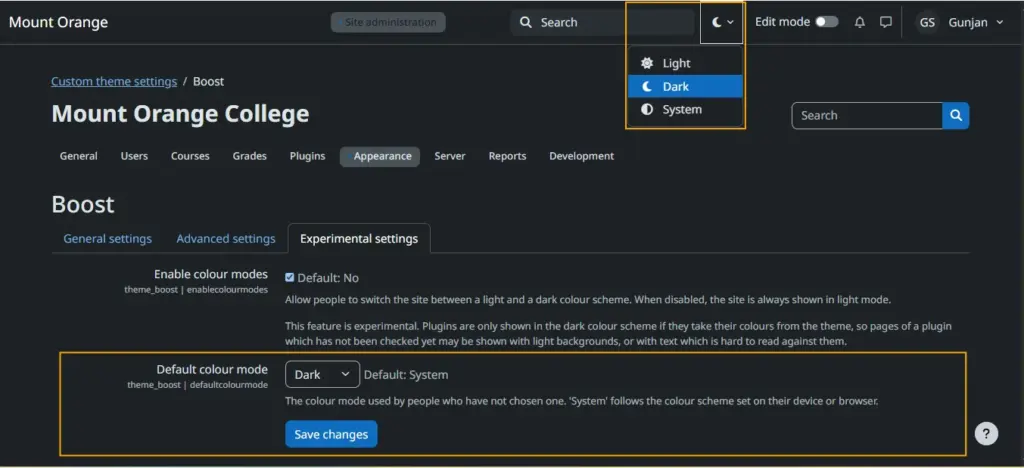
Moodle 5.3 LTS was released on October 5, 2026. It’s a long-term support (LTS) version, so if you’re planning a stable, multi-year platform with long-term security updates, you’ll want to pay close attention. This version puts more focus on design and introduces a new LMS font, an improved block drawer, an inline global search field in the top navigation, and an experimental dark mode for the Boost theme. Course navigation also gets a rethink, with linear navigation available for all courses through a site-level setting.
Beyond the interface, the release brings an MVP of learning outcomes support, further phases of assignment marking workflows, and a new Anthropic Claude AI provider plugin alongside AI user reporting. Quiz users get due dates and a UI for filtering users in quiz reports, while developers should note that the Classic theme has been removed from core and OAuth 2 support is coming to routed web services.
What’s new in Moodle 5.3? 24 new features and fixes
Moodle 5.3’s new features include intentional learning design that helps learners immerse themselves in the material, a clearer interface that makes the experience seamless, and AI integration that allows educators to bring AI into the teaching process more mindfully. Let’s take a look.


New features
- Learning outcomes: Educators can now link learning outcomes directly to the activities and assessments that deliver them, with a new page showing each course’s outcomes and associated activities. For learners, this makes it clearer what they’re expected to achieve and how each activity contributes to it.
- Expanded assignment marking workflows: Assignments now support multiple markers giving individual feedback, along with moderation and sample marking. Educators get fairer assessment for team-marked or high-stakes work, and learners receive more comprehensive feedback from everyone involved in grading.
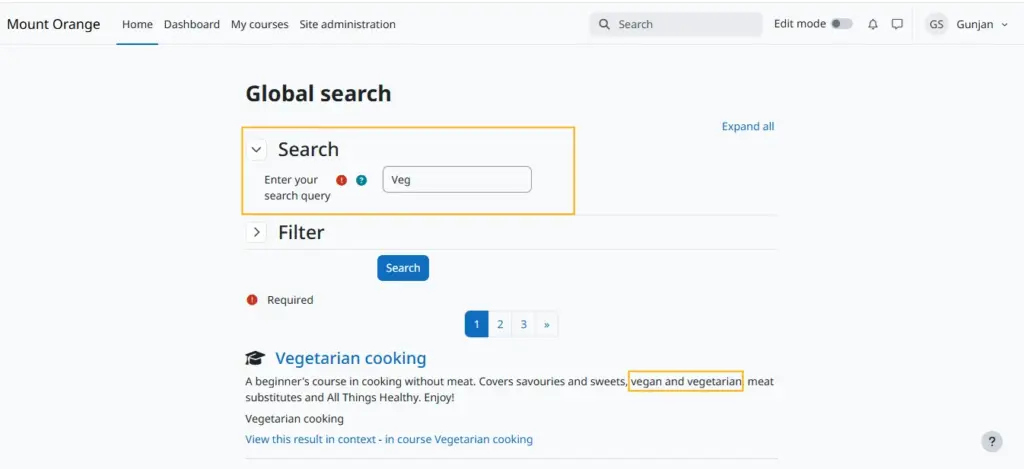
- Refreshed interface: New typography, centered layouts, a clearer course page hierarchy, improved block and course index drawers, and global search placed inline in the top navigation. Less visual clutter means educators and learners spend more time on the content and less time searching for it.
- Previous and Next course navigation: Linear navigation, now available for all courses via a site-level setting, replaces “Back to course” with Previous and Next buttons, and activity completion controls move to a sticky footer. Learners can work through a course in sequence without bouncing back to the course page after every activity.
- Dark mode in Boost: Dark mode reduces eye strain during long study or marking sessions and offers a more comfortable option in low-light settings.
- Anthropic Claude as a core AI provider: Sites can now choose Anthropic alongside the existing AI providers, giving institutions more flexibility in matching AI tools to their policies and needs.
- Course-level AI usage reporting: Teachers and learners can better understand how AI is being used in a course, supporting more transparent and responsible AI use.
- Quiz due dates: Quizzes can now have a due date distinct from their close date, so learners see clear deadlines on their timeline while educators retain flexibility. Quiz reports also gain user filtering, and quiz submission confirmation is more consistent.
- Question bank improvements: The add-question dialog remembers your last-used question bank, bulk actions match the course bulk actions UI, and deleting a category can also delete its questions.
- More content creation options: TinyMCE adds Accordion and List Styles plugins, and educators can add alt text when dropping images onto a course page, making course content more accessible from the start.
- Better reporting and administration: The report builder gets more time-based aggregations and faster audience and filter loading, while resource-intensive tasks such as course deletion now run in the background.
- Smarter global search: Search now matches the start of words, so learners and educators don’t need to enter the entire phrase to search for what they need. Enrollment search also accepts first and last names in any order.
- OAuth 2 for web services: A modern, secure way to connect Moodle LMS with other systems, with support for personal access tokens and token revocation.
- Long-term support: As an LTS release, Moodle 5.3 comes with an extended security support period, giving organizations more room to plan upgrades.
Fixes and updates
- Grading feedback uploads: Submit buttons are now disabled while feedback files are still uploading, preventing educators from saving grades before their feedback attachments are complete.
- Grade import errors: Importing XML grades now displays more detailed information when something goes wrong, so educators can fix problems.
- Quiz statistics during exams: A potential race condition when scheduling tasks, such as quiz statistics running mid-exam, has been addressed, reducing the risk of slowdowns during high-stakes assessments. The statistics delay is also now configurable.
- Subsection activity order: Activity ordering within subsections has been improved, so course content appears in the sequence educators intended.
- User menu layout: The user menu no longer becomes too wide when a custom menu item has a long name.
- Login page images: Custom login page images now center correctly, matching the default image.
- Participants page clarity: Information about users with a “not current” status is clearer, helping educators understand who is actively enrolled.
- Grade report data: The user grade report web service now returns item names for grade categories, fixing gaps in apps and integrations that display grades.
- Admin logging: The upgrade log now records plugin uninstalls, not just installs and upgrades, giving administrators a complete audit trail.
- Login security: Checks on the mobile and web service token endpoint have been strengthened, and new login notifications are now enabled by default.
Moodle 5.3 vs Moodle 5.2: What are the main differences and improvements?
When comparing Moodle 5.3 vs Moodle 5.2, the main difference is that 5.3 is a long-term support (LTS) release, which means you get security updates until October 2029. It also adds learning outcomes, expanded assignment marking, a refreshed interface, and experimental dark mode. Let’s go over the biggest improvements and differences between Moodle 5.3 and Moodle 5.2.
Moodle 5.3 vs Moodle 5.2 at a glance
Feature | Moodle 5.2 | Moodle 5.3 |
Release type | Standard release | Long-term support (LTS) release |
AI integration | Gemini AI and Amazon Bedrock added to core | Anthropic Claude added to core; course-level AI usage reporting |
Learning outcomes | – | Learning outcomes linked to activities |
Assessment and assignments | Multiple markers workflow (Phase 1); flexible grade calculation methods; override reasons for assignments, quizzes, and lessons | Marking workflows Phases 2 and 3: separate feedback per marker, sample marking; custom user fields in grading table |
Quiz and question bank | Collapse/expand categories; in-place editing; question count display; move full categories between banks | Quiz due dates; user filtering in quiz reports; remembers last-used question bank; delete questions with their category; new Safe Exam Browser options |
Course navigation | Redesigned activity dates and completion criteria; new restricted content pages; course title in course index header | Previous and Next navigation for all courses; completion controls in sticky footer |
UI and accessibility | Sticky submit buttons; refined custom field pages; default font set to 16px | New LMS font; centered layouts; improved drawers; inline global search; experimental dark mode in Boost; alt text for dropped images |
Dashboard and login | Refreshed login page; updated dashboard for new installs; MFA visual refresh | Login form helper icons; centered custom login images; display name shown next to avatar |
Forums and collaboration | Real-time Q&A responses; expanded inactivity-based locking options | Icon-based discussion navigation; subscription toggle switch; BigBlueButton enabled by default on new installs, with guest access when logged in |
Course editing | Asynchronous course reset; subsection duplication; improved section saving | Asynchronous course deletion; improved subsection activity order; file upload progress bar |
Report builder | Enhanced filters; wildcard support; schedule status feedback; toast notifications | More time-based aggregations; SQL-based data sources; faster filter loading; Criteria filter in badges report |
Editor (TinyMCE) | “Select all/none” for unused files | Accordion and List Styles plugins; Markdown support (Premium) |
Search | – | Global Search matches the start of words; enrollment search accepts names in any order |
Security | Safer data handling in Flickr repository and mobile notifications | New login notifications on by default; stronger token checks; better visibility of role risks |
Mobile app | Custom user menu items; secure JavaScript allowlist | Deep-linking with auto-login; site logo in app header; more control over disabled features |
Integrations | Composer installation support; React foundations | OAuth 2 for web services, including personal access tokens |
Server requirements | PHP 8.3+; PostgreSQL 16; MariaDB 10.11 | PHP 8.3+; PostgreSQL 17; MariaDB 11.4 |
What are the Moodle 5.3 requirements?
Moodle 5.3 requires you to be on Moodle 4.4 or later to upgrade directly. On the server side, you’ll need PHP 8.3.0 or higher, and only 64-bit versions of PHP are supported. The sodium PHP extension is required, and the max_input_vars setting must be at least 5000. For browsers, Moodle is tested on Chrome, Firefox, Safari, and Edge on desktop, plus Mobile Safari and Chrome on mobile.
Database minimums have gone up in this release: PostgreSQL now requires version 17, and MariaDB requires version 11.4.0, so sites running PostgreSQL 16 or MariaDB 10.11 will need a database upgrade first. The other minimums are unchanged: MySQL 8.4, Aurora MySQL 8.0, and Microsoft SQL Server 2019. Oracle Database has not been supported since Moodle 5.0. As always, Moodle recommends running the latest point release of each requirement.
How to upgrade to Moodle 5.3 LTS step by step
Upgrading your current Moodle version to the new Moodle 5.3 starts with meeting server and database requirements and backing up your current data and progress to protect it during the upgrade. If you’re working with a certified Moodle partner, they can take care of the LMS upgrade process from data backups to finishing touches.
A certified Moodle partner covers:
- Pre-update assessment to make sure your current Moodle version, plugins, themes, and customizations meet the requirements for the new version.
- Server prep to confirm your current PHP, database, and system are ready for the update, and upgrade them if needed.
- Theme and plugin updates to keep everything intact and ready for the migration.
- Testing before the new version goes live, so they can spot any issues before the launch.
- The upgrade itself to ensure a seamless transition and minimal downtime.
- Team training to help your employees understand and navigate the upgraded system.
- Ongoing maintenance so you have a business partner you can rely on while you focus on providing training and courses to your learners.
Move to Moodle 5.3 without stress
Moodle 5.3 brings many new fixes, features, and updates. But if you’re going through the transition steps and system requirements and already feel overwhelmed, Vextur is here to help you every step of the way. As a premium certified Moodle partner, we work with companies, educators, and course creators to ensure they can provide a flawless learning and training environment for their learners. With 99% positive feedback from our clients, our goal is to make sure you don’t have to worry about the behind-the-scenes work that makes learning possible.
Our dedicated team of developers handles everything from Moodle integration to ongoing maintenance. We invite you to book an audit call so we can find the best process for your unique business needs and help you with migration to Moodle 5.3.
FAQs
Is Moodle 5.3 an LTS release?
Yes, Moodle 5.3 is a long-term support (LTS) release, succeeding Moodle 4.5 as the most recent LTS version.
When was Moodle 5.3 released?
Moodle 5.3 was released on October 5, 2026.
Can I upgrade from Moodle 5.2 to 5.3?
Yes, you can upgrade directly to Moodle 5.3 from Moodle 4.4 or any later version, including 5.2. Just make sure your server meets the new requirements first, especially the higher database minimums. If you need a hand moving to the new version, the Vextur team can take care of the upgrade and ongoing maintenance.
What happened to the Classic theme in Moodle 5.3?
The Classic theme has been removed from Moodle core in 5.3. If your site still uses it, switch to Boost or another supported theme before upgrading, or check the Moodle Plugins directory for a standalone version.
How long is Moodle 5.3 supported?
Moodle 5.3 receives general bug fixes for 12 months, until October 4, 2027, and security fixes for 36 months, until October 1, 2029. That’s double the 18-month security window of a standard release like Moodle 5.2.
